Understanding Fast Reports
Parent/Guardian,
Your child's Progress Monitoring 2 Score Report is now available on FOCUS. To access it follow the directions at the bottom of this letter. Below is a description to better help you understand all the information provided in the reports. If you have additional questions, please be sure to reach out to your child's teacher.
This report tells you how your student did overall on the PM2 assessment. At the top of the page is when your student took the test, their scale score (how many points total they received) and their achievement level. Level 1 & 2 are not considered proficient and are below the State Standard. Levels 3-5 are proficient and are at or above the State Standard. You can click on View Detail Report to see how your student performed in each category.
Keep in mind that this is PM2 and many standards are yet to be taught to mastery for your child’s specific grade level. This gives the teachers a clear understanding of where their students’ strengths and weaknesses are so that they can tailor their instruction to meet these needs.
To Check Your Child’s FAST Scores in FOCUS
To see your child's test reports in the Nassau County School District, log in to the FOCUS Parent & Student Portal at focus.nassau.k12.fl.us, then click on the Florida Statewide Assessments icon. This will direct you to the Florida Department of Education's Family Portal where you can access your child's score information.
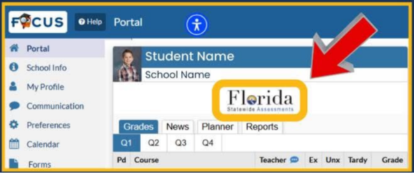
Screen shot of the Focus Portal.
Step-by-step instructions:
Go to the FOCUS website: Open your web browser and navigate to focus.nassau.k12.fl.us.
Log in: Use your username and password to log in to your parent portal account.
Find the icon: Look for the Florida Statewide Assessments icon on the screen.
Click the icon: Click on the icon to be redirected to the FLDOE Family Portal.
View your child's scores: On the FLDOE Family Portal, you can view your child's assessment results.
If you don't have an account:
You will need to register for a Parent Account.
During the registration process, you will need a valid email address, your student's ID number, and your student's birthday.
After creating your account online, you must go to your child's school in person with a government-issued ID to verify your identity and activate your account.
We appreciate your support with testing!
Your B.E.S. Family